Get Started with Environment Management
Welcome to Getting Started with Environment Management. This document will guide you through the environment management capabilities in Harness IDP. To understand the core features and key concepts of Environment Management in IDP, refer to Overview & Key Concepts.
An environment is a collection of software services deployed using CD and executed on infrastructure provisioned through IaCM. Environment Management provides developers with a self-service way to create and manage environments, while platform engineers define the standards behind them. Together, these modules ensure that every environment is consistent, secure, and easy to use.
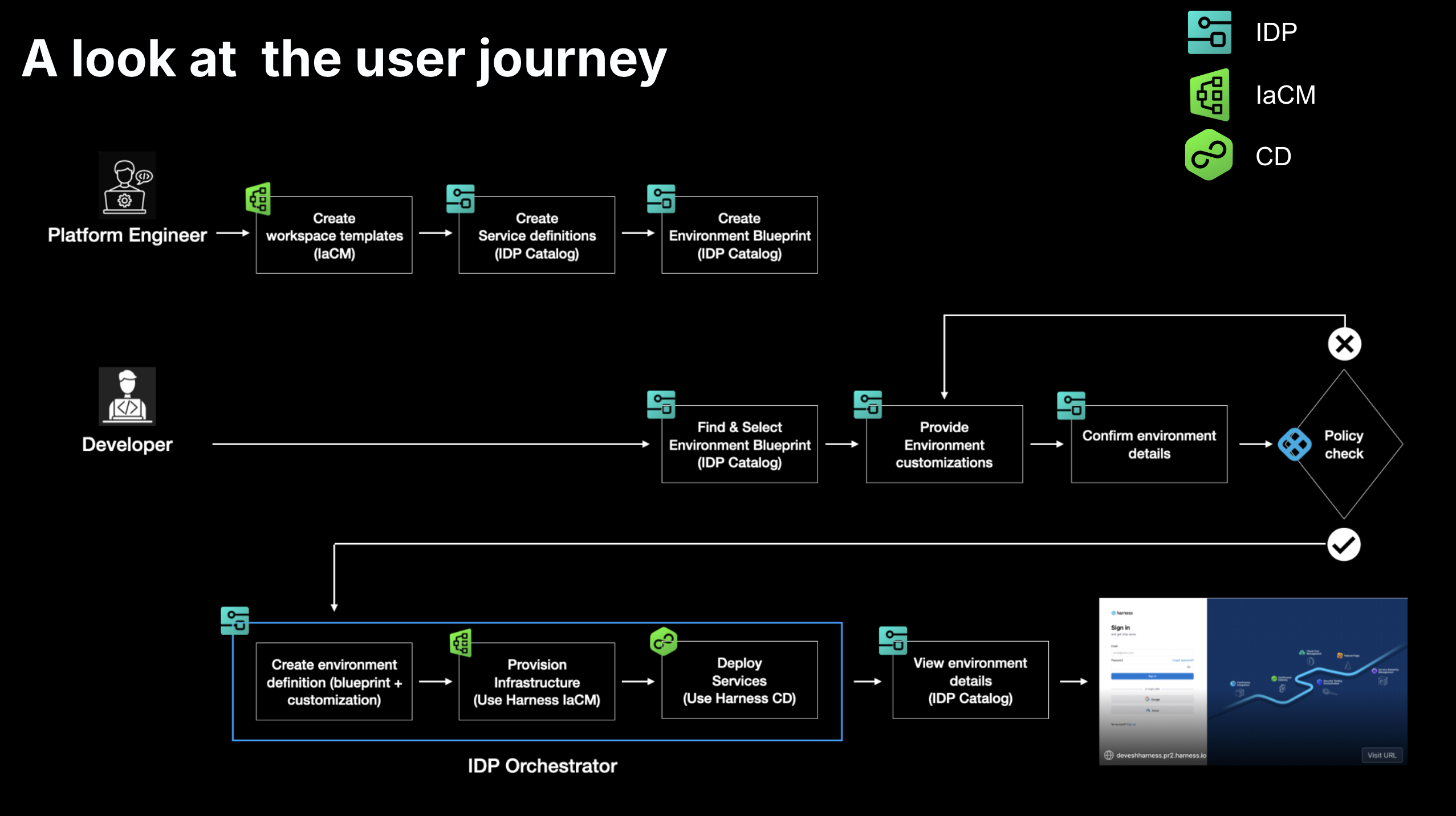
Prerequisites
Use the checklist below to ensure your setup is complete before getting started.
Required Harness Modules
- Internal Developer Portal (IDP) - For environment blueprints and catalog
- Continuous Delivery (CD) - For service deployments
- Infrastructure as Code Management (IaCM) - For infrastructure provisioning
Required Feature Flags
Enable these feature flags in your Harness account:
PIPE_DYNAMIC_PIPELINES_EXECUTION- Dynamic pipeline execution. Click here to learn more.IACM_1984_WORKSPACE_TEMPLATES- Workspace template support
Infrastructure Requirements
- Infrastructure with Harness Delegate installed
- Cloud provider connector configured (GCP, AWS, or Azure)
- Kubernetes connector for the target cluster
- Git connector with API access (for storing manifests and state)
For more details on how to configure connectors, visit Connectors
Secrets & Secret Manager
- Ensure Harness Secret Manager is enabled in your account. Environment Management uses it to store some system-generated keys. Go to Harness Secret Manager Overview to learn more.
- If Harness Secret Manager is not enabled, create a secret
IDP_PO_API_KEYin the same project where environments will be created. The secret must contain a Service Account Token with the following IaCM Workspace permissions:Create,Update, andDelete. This ensures the token has exactly the permissions needed to manage IaCM Workspaces in that project.
Permissions
Click below to view the permissions you would require for each area: IDP, CD, and Platform.
- IDP Permissions
- CD Permissions
- Platform Permissions
Permissions required to manage entities within the IDP
| Resource | Permissions |
|---|---|
| IDP Environment | View Create/Edit Delete |
| IDP Environment Blueprint | View Create/Edit Delete |
| IDP Catalog | View Create/Edit Delete |
Permissions required for managing CD resources.
| Resource | Permissions |
|---|---|
| Pipeline | View Create/Edit Delete Execute |
| Service | View Create/Edit Delete Access |
| Environment | View Create/Edit Delete Access |
Permissions required for managing platform-level configurations and shared resources.
| Resource | Permissions | Notes |
|---|---|---|
| Connector | View Create/Edit Delete | If using a Harness managed code repository for Git based configuration, repository level access may also be required. |
| Secrets | View Create/Edit Delete | |
| Templates | View Create/Edit Delete Access Copy | |
| Delegates | View Create/Edit Delete | Required if delegates are used with connectors. |
Additionally, permissions in Cloud (AWS, GCP etc) to create and manage resources, workloads would be needed.
Once the setup is complete, additional users can be granted the required permissions within Environment Management. For more details, refer to the RBAC section in the Environment Management Overview.
Tutorials
| Name | Description |
|---|---|
| Tutorial 1 - Build an Ephemeral Developer Testing Environment | Set up a self-service ephemeral environment system that automatically provisions isolated test environments for PRs and deletes them after a stipulated time period. |